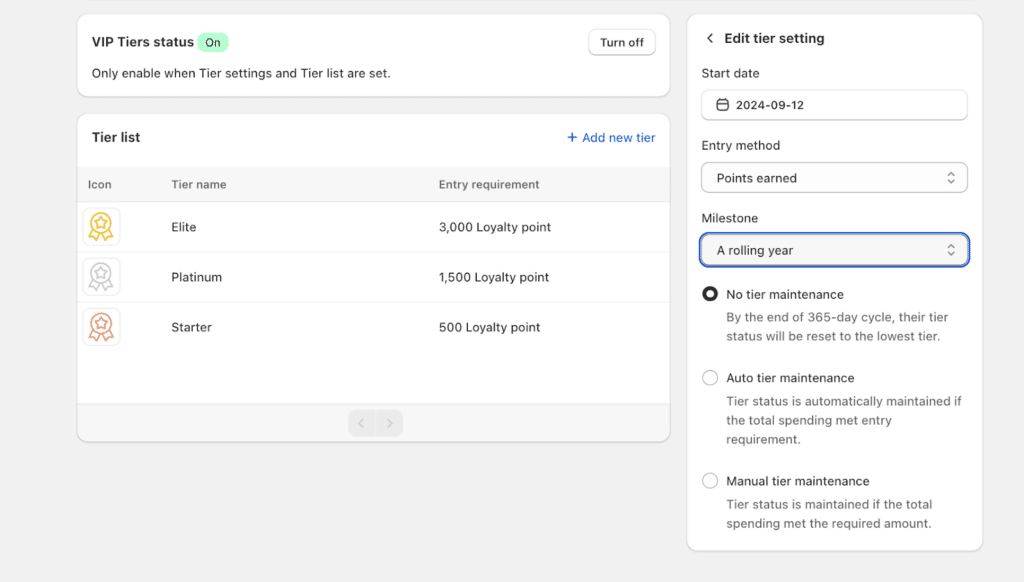
If you are running the VIP program with a one-rolling year milestone, you must be wondering what will happen to customers’ tier status after the 365-day cycle if there is no progress made.
In this document, we will be introducing our latest enhancement for VIP Tier logic: Allowing store owners to set conditions for tier status maintenance and what will happen when each type of configuration is applied.
Choosing the right type of tier maintenance
1. No tier maintenance
If you select this type of maintenance, the customer’s tier status will be maintained for a 365-day period. After this cycle, customers must upgrade to a higher tier, or else they will be placed back to the lowest tier in the next 365-day cycle.
例:: Platinum tier requires 1500 total points earned to unlock. Alex has accumulated 1,600 points on Jan 1, 2026 and secured his place in Platinum tier. Alex’s Platinum status will be maintained from Jan 1, 2026 to Dec 31, 2026. Then:
If Alex unlocks Elite tier before December 31, he can maintain his tier for another 365 days.
If Alex did not achieve enough points to upgrade, he will immediately move to the lowest tier, or be unranked (if the Entry tier has an entry requirement) on Jan 1, 2027. His progress will also be reset to 0.
2. Auto tier maintenance
When tier status is automatically maintained, customers will be re-assigned to a tier based on their actual progress recorded at the end of the cycle (calculated via total spending or total points earned).
If the customer’s tier after being assigned is unchanged, BON will refer to the merchant’s settings to determine if the customer is eligible to receive the Entry Reward again for the new cycle.
例:: Platinum tier requires 1500 total points earned to unlock and tier status is set to be automatically maintained. Alex has accumulated 1,600 points on Jan 1, 2026 and secured his place in Platinum tier. After his rolling year period with Platinum tier:
If Alex’s accumulated progress meets the entry requirement for Platinum, he can maintain his tier for another 365 days.
If Alex did not achieve enough points to upgrade, he will be placed into the according tier for which his progress meets the entry requirements.
3. Manual tier maintenance
Store owners will need to configure the required amount of points/spending in order to extend the customer’s tier status.
To set up this amount, click on the Tier name > Scroll down to Manual Tier maintenance section.
By default, this amount is equal to the Entry requirement of the tier. However, you can adjust this number to your preferences.
Note: This input value must be less than or equal to the Entry requirement of the Entry tier.
If the customer meets the specific spending requirement for their current tier, they will maintain their status.
If they fail to meet the requirement, the system will audit their spending/points for that cycle and place them into the according tier for which they meet the entry requirements.