定率割引(パーセント割引)

このガイドでは、BONで定率割引を効果的に設定する手順をわかりやすく解説します。

はじめに

パーセント割引の提供は、顧客を惹きつけ、売上を伸ばす最も効果的な方法の一つです。 BON Loyalty では、すべてのプランで簡単にパーセント割引を設定でき、魅力的なプロモーションを顧客に提供することができます。

パーセント割引の設定場所と方法

BON Loyalty でパーセント割引を作成するには、次の簡単な手順に従ってください。

  • 次に進みます:BON > ポイントプログラム > ポイント交換 > 追加 > 無料商品。
  • リワードのタイトルを入力してください。このタイトルは顧客に表示されるため、わかりやすく魅力的な内容にしましょう。

プロのヒント:サイトが多言語に対応している場合は、言語ごとにタイトルを更新してください。BONの多言語表示機能は、Basicプラン以上でご利用いただけます。

  • ポイントと割引率の交換比率を設定します。顧客がパーセント割引を受けるために必要なポイント数を決めてください。 例:400ポイントで40%割引を受けられるように設定した場合、顧客にはその条件が表示され、そのまま利用できます。
パーセント割引
  • Discount tags (for Shopify Plus merchants):

    To combine multiple product discounts on the same product at checkout, enter a discount tag here. The tag will be added to every discount code generated from this reward. You must also configure the corresponding discount combination settings and matching tags in Shopify Plus.

    For setup instructions, see Shopify’s guide to combining product discounts on the same product.

追加条件の設定(オプション)

To further customize your Percentage Discount rewards, you can set the following conditions:

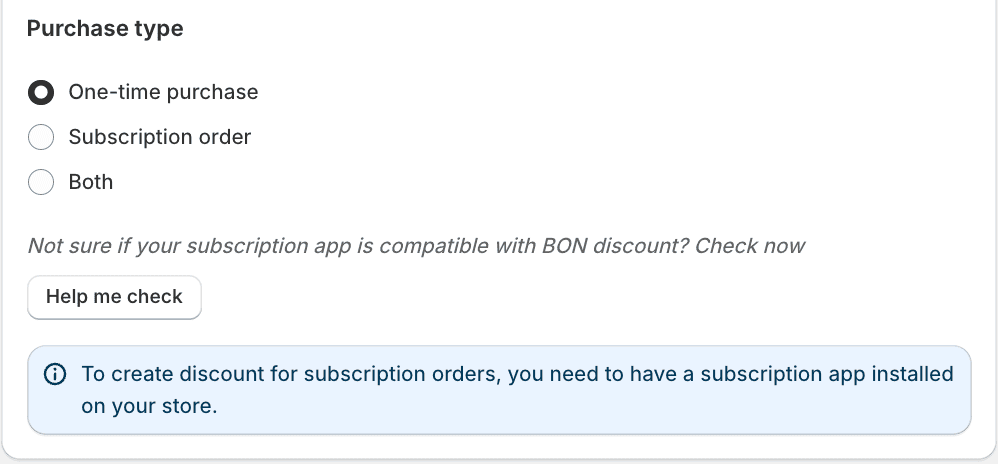
1. Purchase type: To customize which orders are eligible for your Percentage Discount, choose one of the following purchase types:

– One-time purchase: Apply the discount to one-time purchases only.

– Subscription order: Apply the discount to subscription orders only.

– Both: Allow the discount to be used for both one-time purchases and subscription orders.

注記: A subscription app must be installed on your store to enable subscription discounts. Click Help me check to verify compatibility.

2. Minimum requirement: Require customers to spend a minimum amount to apply the discount.

例:この割引は、$20以上の購入にのみ適用されます。

3. Product Restrictions: 割引を特定の商品コレクションに限定します。
例: 割引は特定のコレクション内の商品にのみ適用できます。

4. Reward Expiration: 割引コードの有効期限を設定します。有効期限は、交換後すぐにカウントが開始されます。
例: 交換から10日後にコードが失効します。

5. Eligibility: Select if the discount can be applied to all customers, or only to specific segments. These segments are created in Shopify.

6. Combinations: 他の種類のディスカウントと併用できるように設定します。Shopifyのディスカウントは、以下のようなクラス(カテゴリー)に分類されています。

  • 注文割引
  • 商品割引
  • 配送割引

どの割引クラスを併用できるかを確認し、適切に設定してください。

例: $100 の割引(注文割引)と無料商品割引を併用したい場合は、金額割引の設定で「商品割引」にチェックを入れてください。 その後、無料商品割引の設定で「注文割引」にチェックを入れます。 併用を有効にするには、両方の割引タイプで許可を設定する必要があります。これは、パートナーシップにおける相互同意のようなものです。

注意:BONはアプリ内の設定に基づいてShopifyにコード生成を指示するため、ディスカウント併用のロジックはShopify側で管理されます。詳細については、Shopifyのディスカウント併用に関するドキュメント(こちら)をご覧ください。

このガイドは役に立ちましたか?