


B2B Loyalty Program: Exclusive Tiers and Rewards for Business Partners
This document provides a guide to the B2B Loyalty Program, a feature designed to reward and incentivize your business partners through a dedicated tiered system.
NOTE: This feature is available on the Growth plan or higher, and only for Shopify Plus stores. Check out our Pricing plans for more details!
Overview and Core Function
The B2B Loyalty Program is a standalone feature dedicated exclusively to your business partners.
Unlike the standard loyalty program, this feature operates on its own logic for entry requirements and benefits, and it is not dependent on the regular earning/redeeming structure of your B2C loyalty program.
Eligibility
- Platform: Exclusive to merchants using Shopify Plus.
- Plan: Available on the Growth Plan and higher.
Tiered Membership Logic
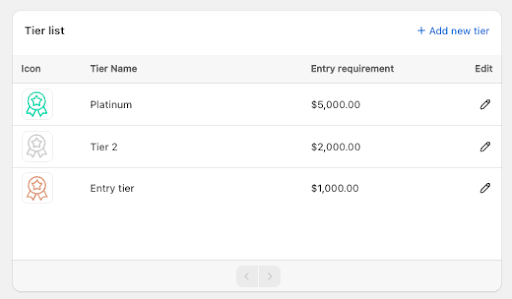
The B2B Loyalty Program segments your business partners into different tiers (e.g., Bronze, Silver, Gold), each offering increasingly valuable benefits and rewards.
1. Tier Entry Requirements
Partners are categorized into a tier based on their lifetime total spending. Store owners define the spending threshold required to reach each tier.
2. Tier Rewards (Upon Tier Achievement)
When a partner reaches a new tier, they receive a one-time set of Entry Rewards. These rewards can include:
- Product discount (fixed amount or percentage)
- Order discount (fixed amount or percentage)
- Exclusive access to catalogs
- Shipping discount
Conditions and Limitations: Each reward can be configured with:
- Specific product or collection eligibility
- Number of items required in an order; Purchase amount required to unlock each discount level
Detailed Entry Reward Types:
a. Amount Off Product
This reward applies a discount to individual products within an order.
Type | Description | Example |
Fixed Amount | A fixed monetary value discount is applied to all or specific products. | Discount value is $5. If applied to all products, each product in the order receives a $5 discount. |
Percentage | A fixed percentage discount is applied to all or specific products. | A 10% discount í applied to all items in the ‘Electronics’ collection. |
Conditions | Applicable to specific products or collections, and can be combined with other discounts. |
b. Amount Off Order
This reward applies a dynamic discount to the total order value, based on volume or order count.
Criteria | Fixed Amount Discount | Percentage Discount |
Order Value | A tiered fixed amount discount based on the total order value. Example: Buy at least $200 to get $5 off; Buy at least $400 to get $10 off. (The required value for the next tier must be higher than the previous.) | A tiered percentage discount based on the total order value. |
Item Quantity | A tiered fixed amount discount based on the number of items in the order. Example: – Purchase 201–300 items -> Get $8 off. (The minimum quantity of the next range must be higher than the maximum of the previous.) | A tiered percentage discount based on the number of items in the order. |
Conditions | Requires a minimum purchase, and can be combined with other discounts. | Requires a minimum purchase, and can be combined with other discounts. |
c. Exclusive Access to Catalogs
This reward grants specific customer segments access to private catalogs that feature discounted prices.
- Action Required: The merchant must first set up the catalog and define its eligibility criteria within Shopify Admin before assigning it to the specific B2B tier.
d. Free Shipping
This applies a discount to the shipping fee of the order.
- Logic: A fixed amount discount is applied to the total shipping fee.
- Exclusion: If the customer chooses a delivery option like “Pick up in store”, the shipping discount will be disabled.
- Conditions: Limited by a maximum applicable shipping fee and can be combined with other discounts.
Tier Adjustments (Upgrade, Downgrade, and Refunds)
1. Partner Upgrades
When a business partner meets the requirement for a higher tier:
- Benefits apply immediately to all company members.
- Changes are reflected in the next order placed.
- Previous tier benefits are removed automatically.
- All company locations inherit the new tier level.
2. Partner Downgrades (General)
When a business partner falls to a lower tier:
- All tier benefits and rewards of the previous tier will be disabled.
- New tier benefits and rewards will be applied since the most recent order after the tier has been adjusted.
3. Handling Refunds
- The refunded amount is subtracted from the company’s total spending.
- If the adjustment causes the company to fall below a tier entry requirement, the current tier is automatically downgraded.
- Once downgraded, all company members immediately lose access to the benefits of the previous tier .
Setting Up a B2B Partner Account
To ensure an account and its orders count toward the B2B Loyalty Program, the customer must be defined as a Business Partner linked to a Company Profile.
Step 1: Add Company
- Go to Shopify Admin
- Navigate to Customers > Companies
- Select Add Company
Step 2: Add Customer to Company
- During this setup, link existing customers to the newly created Company Profile.
- Merchants can choose to include this customer’s orders in the company’s total order volume (and vice versa).
Identification and Order Processing
- Customer Tag: Customers who are successfully added to a company profile will automatically be tagged with ‘Biz’ in your Customer Data.
- Order Eligibility: An order will be counted towards the tier’s progress only if the order detailed info has the ‘company’ tag, signifying it should be processed by the B2B portal.
Was this guide helpful?
On this page
Toggle