Learn how to configure BON loyalty discount codes to apply to one-time purchases, subscriptions, or both – and control how discounts behave across recurring payments
IMPORTANT NOTES:
You will need to subscribe to the Basic plan or higher to unlock this feature. Check out our Pricing plans for more details.
This feature is supported only when there is a subscription app installed.
Understand subscription discount options
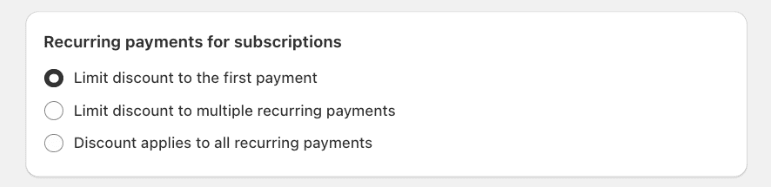
When a reward’s purchase type is set to Subscriptions (or Both), merchants can choose how the discount behaves across recurring charges:
Option
What it does
Limit to the first payment
Discount applies once, on the first subscription charge.
Limit to multiple recurring payment
Discount applies to a fixed number of recurring charges, then stops.
Apply to all recurring payments
Discount applies to all recurring charges for the life of the subscription.
Customers see whether a reward is redeemable against a one-time purchase, a subscription, or both, at the moment they redeem it – so there’s no confusion at checkout.
How “specific number of payments” behaves: A discount configured for, say, 5 recurring payments:
Can be applied once and benefit up to 5 subsequent charges (including the first).
Cannot be applied for 2 payments, removed, and then re-applied later for the remaining 3.
Cannot be split across two subscription contracts (e.g. 2 payments on one, 3 on another).
Verify subscription support in the merchant’s store
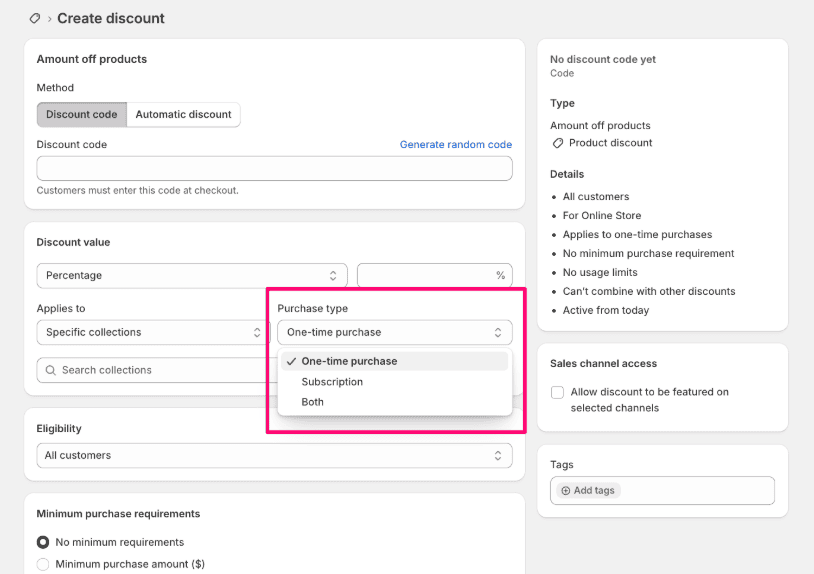
The purchase-type option only appears for stores that support subscriptions. A store supports subscriptions when:
A subscription management app(e.g. Recurrpay, Seal Subscription App) is installed, an
At least one subscription billing plan is linked to a product.
Quick check for merchants:
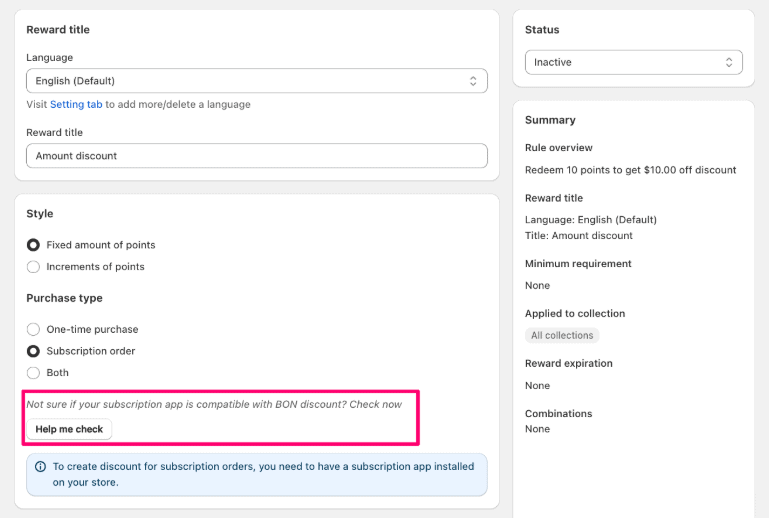
Click on the button ‘Help me check’ in the discount configuration window to check if your store works with subscriptions. OR,
Go to Shopify Admin > Discounts > Create discount. If purchase-type options appear there, the store supports subscriptions and BON’s setting will work.
Configure purchase type in BON Admin
Even if a store supports subscriptions, the subscription app itself must support discount codes for the discount to apply to a shopper’s current subscription. Otherwise, the discount can only attach to new subscription contracts at checkout.
To make a BON reward compatible with subscriptions:
Go to Points program > Redeem points
Select the reward you want to edit (e.g. Amount discount).
In the Purchase type section, choose one of: One-time purchase Subscriptions Both
If you selected Subscriptions or Both, choose the recurring behavior: First payment only, Specific number of payments, or Every payment.
Save the reward.
Once configured, the discount can be applied:
At Shopify checkout, when a shopper is purchasing a subscription product.
Through the subscription management portal provided by the merchant’s subscription app (if that app supports discount codes).
Applying loyalty discounts to subscriptions
New subscription orders: shoppers redeem their BON reward as a discount code at Shopify checkout, same as any other purchase.
Existing subscriptions: shoppers manage this through their subscription app’s customer portal – this only works if the subscription app supports applying/editing discount codes on active contracts.